




If you’re like many of the organizations we talk to, you’ll have hundreds, if not thousands, of pages in your Confluence sites.
From project plans and product briefs to HR policies and IT procedures, all teams across an organization can use Confluence to collaborate on and create documentation.
However, not all of these teams know how to use Confluence for document management. We’re here to shed a light on this.
How do you use Confluence to manage your documentation?
You can use Confluence for documentation management by using a combination of native features alongside powerful Atlassian Marketplace apps, such as Workflows for Confluence.
Confluence is already a powerful platform for creating and editing content, storing documentation and acting as a single source of truth across teams. Documentation stored in Confluence could include everything from HR policies to Marketing plans.
In order to keep a range of organizational docs secure and up-to-date, you’ll need to embed solid document management processes, such as approval and publishing workflows, access permissions, and archiving. You can do all of this in Confluence using existing functionality, strengthened with third-party apps.
Excellent. So, will you explain exactly how to use Confluence capabilities and Atlassian Marketplace apps for documentation management?
We sure will.
We’ll start with the basics (what exactly is a document management system?) before taking a closer look at how to manage your documentation using both Confluence’s native tools and third-party apps.
- What is document management?
- What is a document management system?
- Why is document management important?
- How to manage your documentation in Confluence
- Confluence native functionality
- Using third-party apps
- Workflows for Confluence
Ready to jump into your ultimate guide to Confluence Documentation Management? Let’s go.
What is document management?
Document management is the process of capturing, monitoring and storing information. Essentially, this means you know which documents you have stored (in this context, in Confluence), where they are and what their purpose is.
If you create, edit and store documentation in your Confluence, then you’re probably undertaking some form of document lifecycle management – even if you don’t realize it!
For added protection and peace of mind, many organizations employ a document management system.
Did you know, we created the Workflows for Confluence app to support your end-to-end documentation management in Confluence? Find out how it could help you, with a free trial from the Atlassian Marketplace!
What is a document management system?
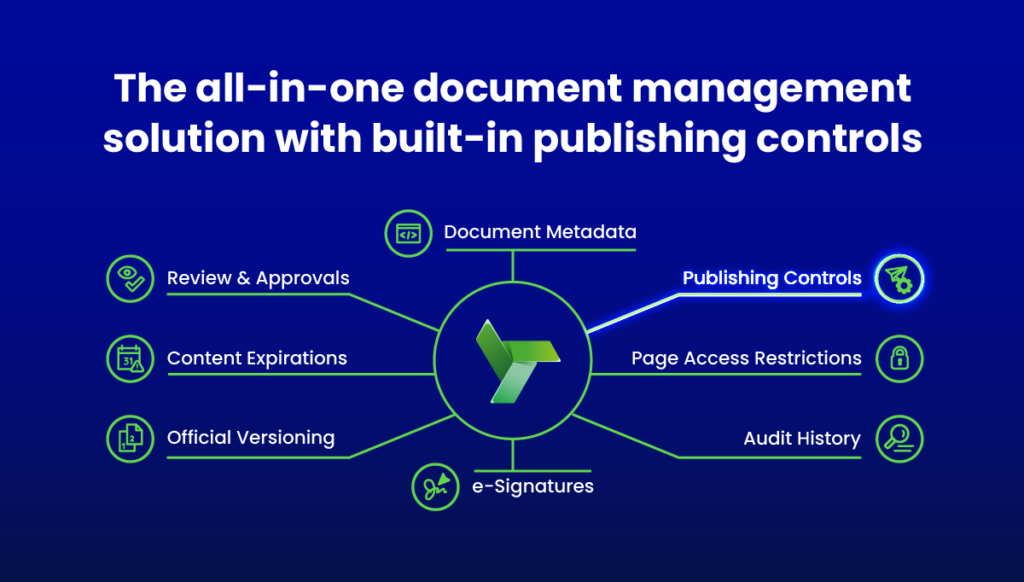
A document management system takes the basic principles of document management and puts processes in place to securely track and protect your data. This could include archiving documentation, managing sharing permissions and recording modifications or access requests.
Some organizations will need a comprehensive process to manage both digital and paper-based documentation.
In this post, we’re focusing solely on the documentation you create, share, and store within Confluence.
Why is documentation management in Confluence so important?
From bolstering your data protection processes, to enhancing your team’s productivity, effective document management can deliver significant benefits.
6 benefits of using Confluence for documentation management
- Enhanced document review processes (particularly if you use automated workflows)
- Greater productivity. Seamless processes and robust systems reduce repetitive, manual tasks.
- Stronger cross-team collaboration
- Better compliance and risk management
- Contributes to improved security and data loss prevention processes
- Improved data access controls
Now let’s dig into those benefits in more depth…
Enhancing your document review process
Successful document management will support your content approvals processes.
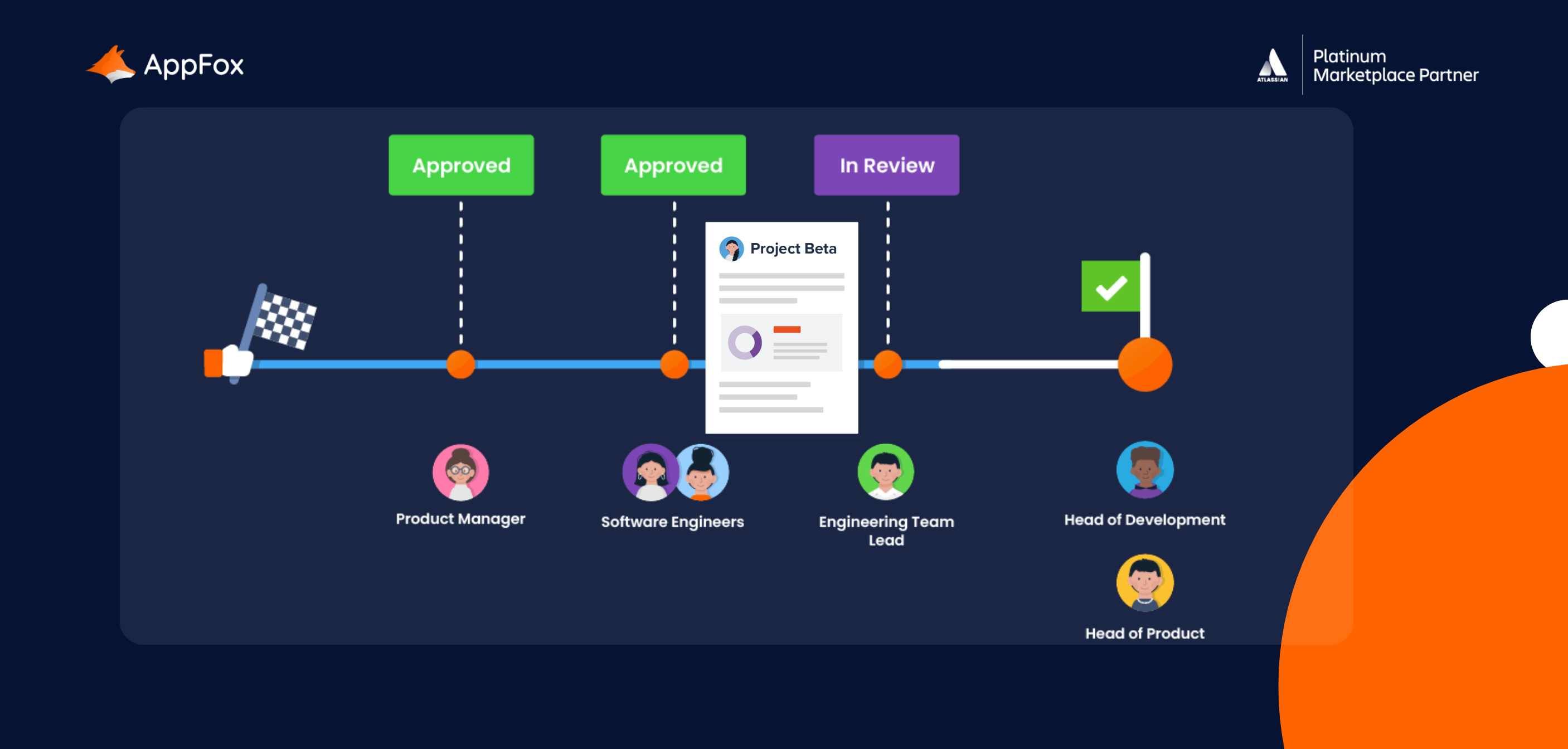
To move work forward and to maintain quality, it’s essential to embed a centralized and automated approvals process.
As part of this process, you’ll want to keep a tight handle on document versioning, and to have a record of edits or modifications. Your document management strategy can deliver this intel, lending itself to tighter publishing controls.
Greater productivity
One of the joys of business processes and systems is that they just make life easier for everyone. With clear processes and procedures, your documents will be organized, so users and teams know exactly how and where to access the data that they need.
When information is clearly indexed, it is more findable, saving time and enabling your teams to be more productive and efficient.
Enhanced collaboration
Having a centralized platform and clear document management controls can help your team to better collaborate.

It’s clear where documentation is stored and, crucially, informs them about which information should not be shared.
Compliance and risk management
A sustainable and effective document management process will support your organization’s wider security, compliance and risk management policies. It may also play a role in any industry legislation or requirements with which you need to comply.
Security and data loss prevention
We’re betting that your organization’s Confluence is home to a ton of diverse information.
With multiple teams, various spaces and potentially thousands of pages, sensitive data is vulnerable to misuse (whether intentional or not) if you don’t have the right processes in place.
Robust document management can play a role in your wider Information Security and Data Loss Prevention strategies. It should establish clear roles, workflows and actions to ensure you’re confident in the location, status and security of your documents.
Want to secure your sensitive data in Confluence?
It’s likely that every organization’s Confluence is home to confidential information – but would you know exactly how much, or where it’s stored? Discover how you can protect and detect with our Ultimate Guide to Sensitive Data in Confluence.
Improved data access controls
Ensure only authorized users can access the documents they need – and make it easy for them to do so.
Robust document management can improve your content access controls. To further enhance your organization or team’s approach to data access, you might want to consider embedding data classification levels.
Organize your Confluence pages with data classification
Data classification is essentially a hierarchy of levels used to categorize your pages in Confluence.
You can achieve a version of this with native Confluence functionality, or extend the process with automated access controls by using a third-party app (check out Compliance for Confluence ).
For a deep dive into data classification, how to use and it why it’s so important, we’ve created The Ultimate Guide to Data Clasification in Confluence for you to answer all your Qs.
All of these benefits sound great, don’t they. But how can you actually implement effective document management into your day-to-day Confluence processes?
How to manage your documentation in Confluence
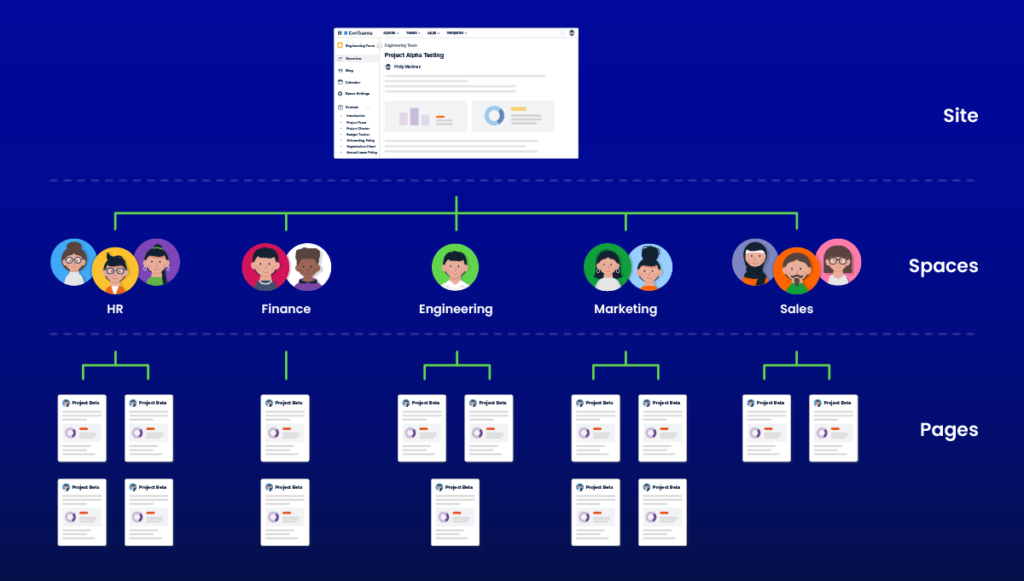
To really understand how you can manage your documentation in Confluence, it’s worth revisiting its architecture.
Familiarize yourself with the Confluence structure
Once you are clear on Confluence’s hierarchy, you’ll be in a stronger place to locate, store and organize your data.
Confluence site
You’ll start off with your Confluence site. Now, you may have multiple sites within your organization, but it’s more likely that you’ll have one site and then different spaces for different teams or business areas.
Space(s)
Depending on your company’s size and structure, you’ll probably have a different space for each team. Some organizations have spaces for specific projects, too.
You can also set up your own personal space, which you can think of as your digital notebook. To-do lists, plans, drafts… Essentially, anything you’re not ready to share yet or want to keep to yourself, use your own personal space.
Do check your settings though – as personal spaces can be set to private or public.
Top Tip
Did you know that you can ‘watch’ spaces?
If you want to keep up to date with the activity within a space, simply use the Watch feature and you’ll receive notifications each time a change is made. You automatically watch pages that you create yourself (this is called autowatch). You can also opt out of watching a page or space by selecting the eye icon and unchecking the Watch page feature.
Pages
Within your space, you’ll be able to create pages.
Confluence’s tree structure enables you to organize your information using ‘Parent’ and ‘Child’ pages. For additional content, you can also add sub-pages.
If you have a lot of child and sub-pages, the ‘Children Display Macro’ is handy. It can display a real-time list of relevant pages within a space for quick access or navigation, and any time pages are added or removed, the list updates.
Attachments
You can upload a file to any page within your Confluence, using any file type. You can’t add a folder, so make sure to convert your files to a zip file before uploading!
There’s another useful macro here, which displays a list of all attachments on a page, so items at a glance.
How can I use Confluence native functionality to manage my documentation?
You can use the following from Confluence’s built-in features to manage your documentation:
- Confluence’s page-tree hierarchy is useful when organizing and identifiying documents
- To track and monitor documentation, you can watch pages, use Confluence’s native page history function as a basic change log, and Confluence page versioning to compare edits.
- You can make use of built-in page labels, or manually add a status to the top of each page. This helps to protect and store your documentation. You can also restrict user access manually using the red padlock at the top of Confluence pages.
- To support a document review process, you could manually apply page statuses or page labels to indicate ‘draft’, ‘in progress’ or ‘approved’ status, for example.
Using this combination of native features means you can achieve the fundamental principles of documentation management in Confluence:
- Capturing and identifying your documents
- Tracking and monitoring documentation
- Storing and protecting documents
- Reviewing and approving documents
There’s no doubt that Confluence is a powerful tool with immense native capabilities. But often, people want (and need) more.
And that’s why we built the popular marketplace app, Workflows for Confluence.
What is the Workflows for Confluence app?
Workflows for Confluence is an Atlassian Marketplace app, created by our team here at AppFox.
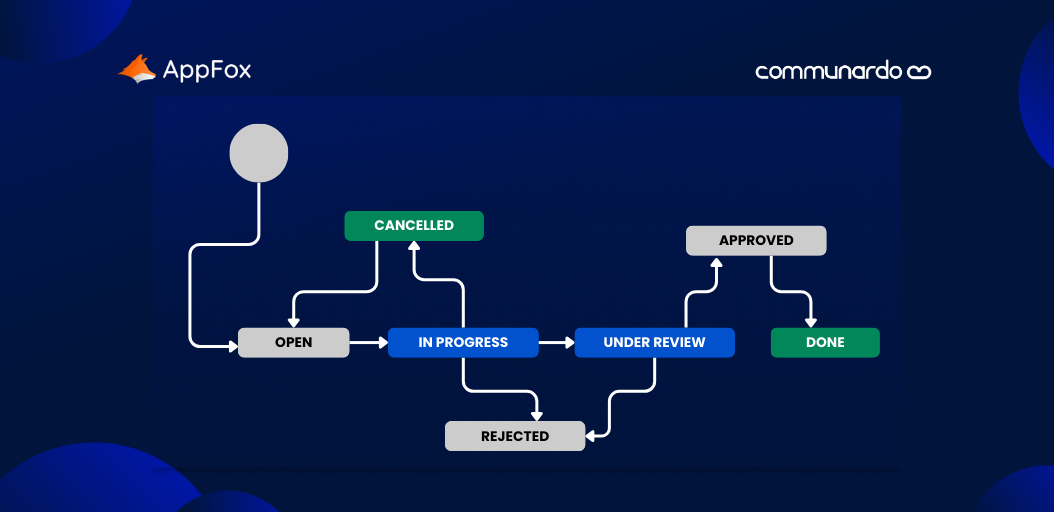
Organizations use the app as an all-in-one document lifecycle management tool. Teams can build custom workflows with the simple ‘drag n drop’ workflow builder, and automate key processes, such as document approval, publishing, and content expiry processes.
Let’s look at three features you can use in the Workflows for Confluence app to enhance your documentation management.
Ready?
1. How to create custom workflows for unique content in Confluence
Right at the top of this piece, we celebrated the fact that Confluence is used by so many different teams, all working on wildly different projects and documents.
It makes sense then, that you might need to apply specific approval steps for certain types of content.
With the Workflows for Confluence app, you don’t make a one-size-fits-all approach work for product briefs, appraisal notes and legal docs. Instead, you can create custom workflows for each.
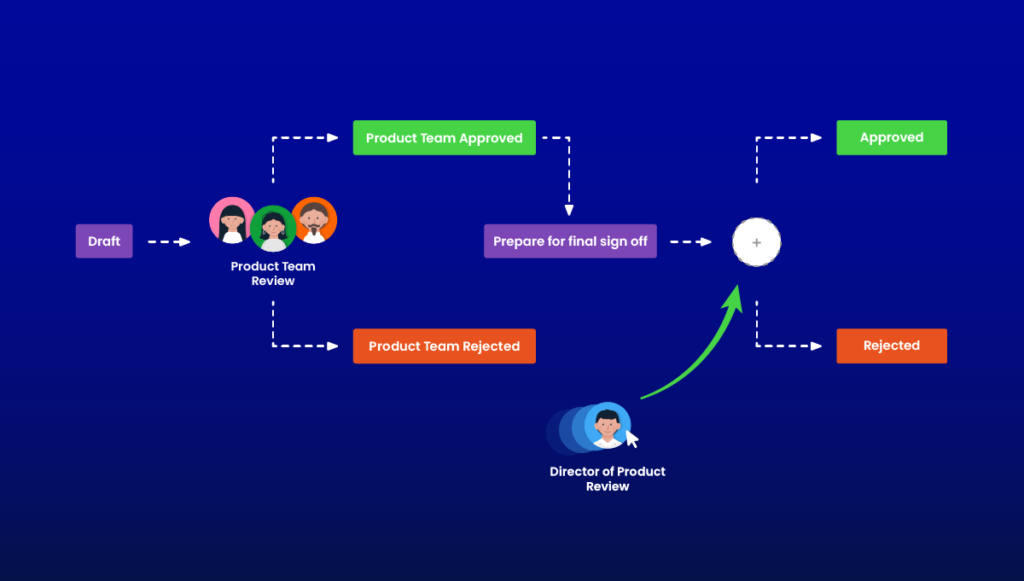
You can use the drag and drop workflow builder to create approval steps super quickly – and they can be as complex or as simple as you need!
For extra ease, you can assign workflows automatically to your pages.
2. Using automated actions to enhance Confluence documentation management
We’re all familiar with the bottlenecks of document reviews, aren’t we? From waiting for feedback and sending reminders, to forgetting to share a draft in the first place (whoops!), it’s all too easy for human error and busy schedules to stall progress.
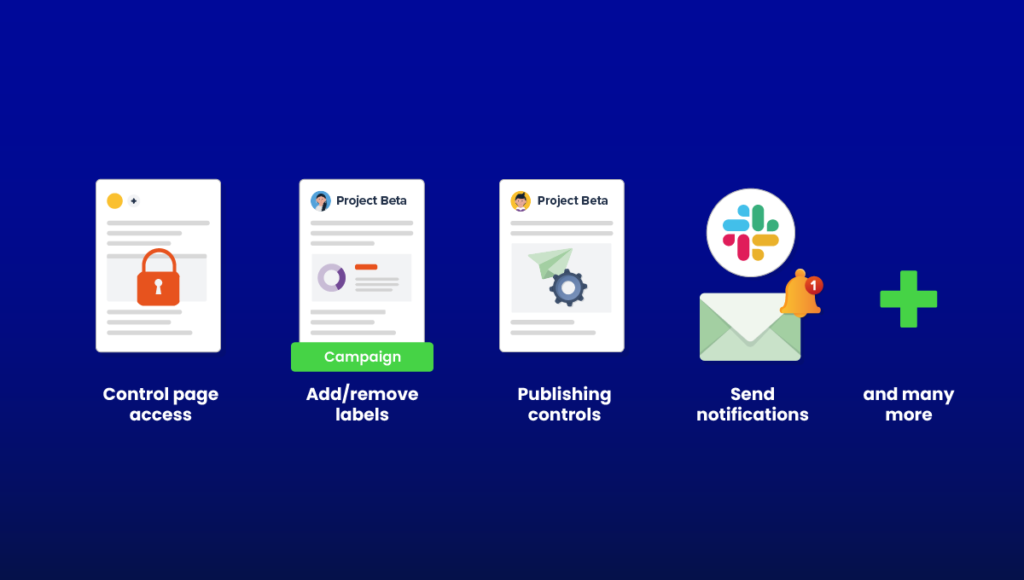
Workflows for Confluence enables you to add automated actions at each step of your workflow. It could be notifying an approver that they need to review your content, sending a reminder notification that their feedback is required, or automatically updating the status of a document.
3. Integration with other tools
For a more cohesive and efficient experience, you can connect Workflows for Confluence with tools like Outlook or Slack. This means better collaboration for all stakeholders, quicker communication and a smoother process.
Top Tip
Housekeeping is key to maintaining the quality and consistency of your documentation, so make sure to schedule an annual review of your tools, strategy and process.
Whether you’re using Confluence’s native functionality, our Workflows for Confluence app, or another tool, you need to still regularly review your document management processes.
Check your workflows are still all relevant and in use, that you haven’t retained any inactive or old reviewers, and that your documentation is still being organized, stored and archived appropriately.
Now, those are just three of Workflows’ many features. Ultimately, Workflows for Confluence is an all-in-one document lifecycle management tool designed to make your approvals and review process more efficient and effective.
In line with your wider document management strategy, it also enhances your document monitoring and tracking, as the app provides full workflow histories – enabling you to instantly see where comments have been made, if changes have been applied, where delays are occurring and the status of all documents within your workflows.
Using Workflows for Confluence for your document management
As a simple takeaway, document management is really important and can help your teams be more efficient whilst remaining compliant with your policies and processes.
With Confluence’s native features, you can embed a pretty strong document management process, which is great. And with Workflows for Confluence, you can take it that step further, with greater flexibility, useful integrations and clever automation.
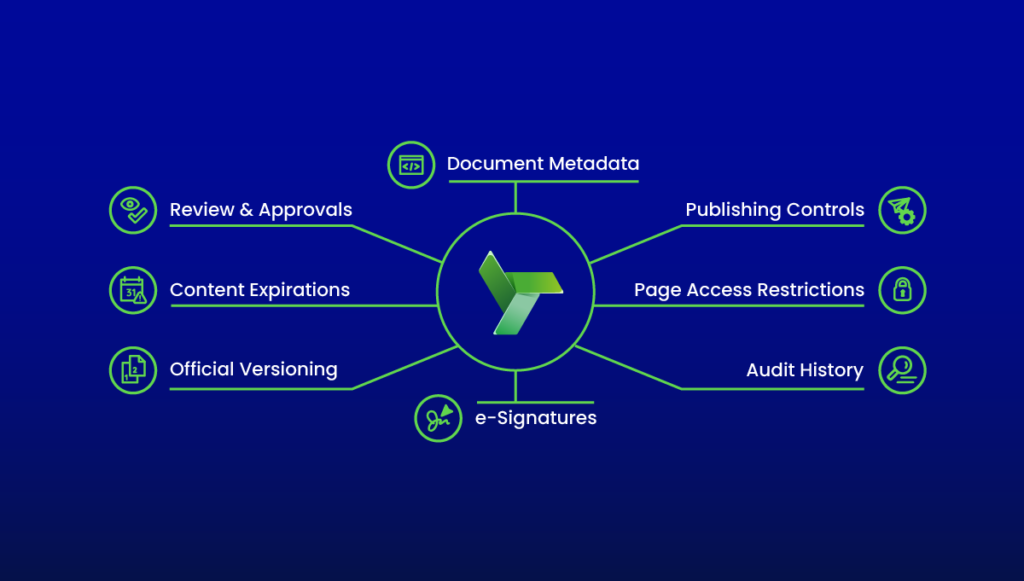
Whichever route you choose, we hope you feel more confident in how to keep your documents safe and well-managed in Confluence after reading this guide.
And if you happen to drop into the Atlassian Marketplace, why not give it a try for free? Discover how to transform your document management with Workflows for Confluence.