





The One Task You Should do Pre-Migration? A Jira End of Life Health Check.
Following Atlassian’s Data Center End of Life news, we’d bet those of you on Data Center products are discussing key questions across your teams.
Is migrating to Cloud right for us? (The recent announcement of Atlassian’s Isolated Cloud may bring some of you in highly regulated industries reassurance on this point.)
You might then wonder: If Cloud is the right step, how do we prepare for a smooth migration?
We can help with the second of those questions.
Optimizer for Jira: Your essential app for Cloud migrations
Optimizer for Jira is an Atlassian Marketplace app. Some of you may already be using it for your Data Center sites – but if you’re brand new to the app, here’s a brief intro.
What do teams use Optimizer for Jira for?
Described by one user as a ‘Jira Admin’s best friend’, Optimizer for Jira has been designed to drastically reduce manual tasks and housekeeping for Jira users.
We all know the pain of duplicate custom fields or inactive projects cluttering up your instance. It’s easy for these to spiral out of control, and we’ve seen first-hand how this kind of disorder impacts usability, data accuracy, performance and compliance controls.
Optimizer for Jira provides you with a bird’s eye view of your Jira site(s). You can run an instant health check to understand how your instance is performing, quickly identify problem areas, and make bulk updates.
This all sounds super useful. But where’s the link with a Jira Cloud migration?
For those of you leaving behind Jira Data Center and preparing for an Atlassian Cloud migration, it’s valuable to schedule a Jira end of life health check.
Undertaking this work is important for a few reasons:
- You’ll only migrate the data you really need (rather than a load of old or duplicate data, which will clutter up your new Cloud instance).
- It’s valuable opportunity to review your compliance controls. Remove old users who may have left your team or organization, review your integrations, and check access controls.
- Your team can get to work faster in your fresh new instance following the migration – rather than being held back by inaccurate data, or search results muddled by old work items.
Ultimately, investing in a Jira end of life clean-up ahead of a migration will save you time (and improve user satisfaction!) on the other side.
Optimizer for Jira is the ideal tool to turn this end of life health check work into a fast, secure and powerful process.
What do we mean by a Jira end of life health check?
Rather than simply lifting and shifting your DC data to your new Cloud instance, an end of life health check enables you to understand the problem areas of your existing Jira.
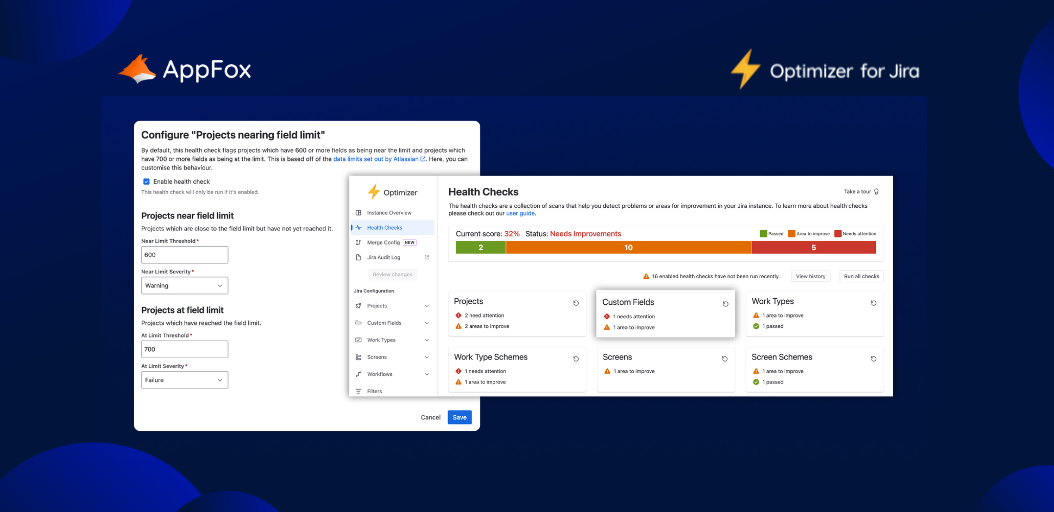
An Optimizer for Jira health check provides you with visibility over the following:
- Spaces – no. spaces active, archived, small or empty, nearing field limit, etc.
- Custom fields – duplicates, active, inactive, etc.
- Work types
- Screens
- Schemes
…and more – all instantly visible to you in one place. What’s more, with Optimizer you can configure these health checks to reflect your organization’s thresholds and metrics. (What constitutes inactive, for example? One month? Six months?)
This kind of health check is particularly useful when you’re approaching Jira end of life, as you can quickly identify the problem areas you need to tackle ahead of your Cloud migration.
Okay, I’m listening. So else can you actually do with the Optimizer for Jira app?
Sure, let’s get into some specifics.
1. Bird’s eye view
When you first open up Optimizer for Jira, you’ll always get a bird’s eye view of your instance. This means you can instantly see the number of projects, custom fields, schemes, screens, workflows and more, in one central dashboard.
Having all of this data in one place can help you gain a real handle on the scale of your end of life instance. (And an appreciation of why it’s so important to tackle clutter before your Cloud migration.)
2. Site audit
As we mentioned, you can run an end of life health check, which will grade your instance. Through this, you’ll be able to quickly identify problems, and see which areas are performing well.
You can also export these health checks, so you can share with teammates – either as evidence of the work you’ll need to do, or to demonstrate where you’ve made improvements.
3. Insights and smart tables
With dynamic smart tables, you can see exactly where to focus your efforts. Crucially, you can also view dependencies and related objects.
You can then make improvements at scale with bulk changes, custom-field merging and inline edits – simply and securely.
4. Instant identification of duplicates and unused items
The Optimizer for Jira app will quickly identify duplicate custom fields, unused projects and other configurations that you no longer need in Jira. Clear the clutter with those bulk changes we mentioned above, including popular features like custom field merging.
5. Queued changes for approval
Bulk changes are fantastic for saving time. But we’ve all felt the cold sweat of making a large-scale change and the wondering if we’ve wiped something too hastily – especially at a crucial time, pre-migration.
Optimizer for Jira queues every change – big or small – for your approval. So, you can check each decision and approve before execution. No sweat.
Did you know?
Optimizer for Jira now supports Jira Service Management (JSM) too! Simply install (or upgrade) to the Advanced Edition, and you can bring clarity and structure to your JSM instance too.
Bring on the smart tables
Add Optimizer for Jira to your Atlassian Cloud Migration Toolkit
Running a Jira end of life health check is essential preparation work ahead of your Cloud Migration. And Optimizer for Jira is an essential tool to help you with this prep.
When you’re moving to Atlassian Cloud from Data Center, you need to get your instance in the best shape possible. Investing in preparation now can save your team real time and effort on the other side.
So, try Optimizer for Jira free today on the Atlassian Marketplace, and add it to your Cloud migration preparation toolkit.
If you have any questions, please reach out to our team! We’re always happy to talk all things Jira, migrations and more.