




New Atlassian Data Limits: How Optimizer for Jira Will Help Your Teams
Recently, Atlassian announced new data limits and guard rails for Jira Cloud, including a limit of 700 fields per company-managed project.
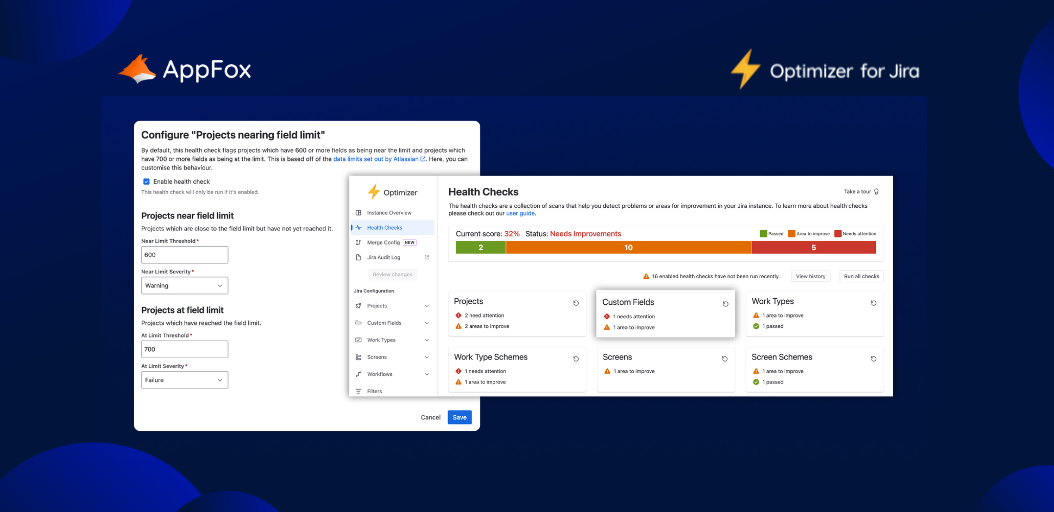
To help your teams manage this new limit effectively, we’ve been busy behind the scenes here at AppFox, developing two new features in the Optimizer for Jira app – including a ‘Projects nearing field limit” health check. Today, it’s time to share the details with you all.
What are the new data limits and guard rails (and why has Atlassian introduced them)?
Atlassian shared that these new data thresholds would take effect in February 2026, so you have some time to prepare if the announcement has impacted you.
There are two key components:
- Data limits will apply to fields and work types. You’ll now be allowed up to 700 fields in a space (Atlassian’s new terminology for ‘project’) and a maximum of 150 work types per space. Data limits are firm thresholds, which you will not be able to exceed. This is to prevent potential performance issues.
- Guard rails will relate to work items and spaces (projects). Now, unlike data limits, guard rails are recommendations. Atlassian suggests that work items should be kept below 18,000,000 items per site, and spaces (projects) at below 8,400. These recommendations are in place to enhance data management and configuration.
Note! The new Atlassian data limits we’ve described above only apply to company-managed spaces. Team-managed spaces already have a limit in place of 50 custom fields per space.
How will Optimizer for Jira help me with these new Atlassian data limits?
There are two ways that the Optimizer for Jira Cloud app can help you to manage these new field data limits from Atlassian.
The first is a Projects nearing field limit health check. You can run this to find any projects which are running close to, or above, Atlassian’s incoming new limits.
Spotlight on terminology!
As some of you may know, Atlassian is phasing out the term ‘projects’ in Jira, and replacing it with ‘spaces’.
We will be updating the terminology used in Optimizer to reflect this at some stage – but for now, the app still features the familiar term ‘projects’ (and we know many of you still use this word in your own teams).
Keep your eyes peeled for labelling changes in the app in the future.
The second is Optimizer’s new ‘Field Count Column’ in the Projects configuration table, so you can instantly see how many fields each different project has.
Preparation and visibility
These two new features in Optimizer will help your teams to prepare for the incoming Atlassian field data limits (arriving February 2026). You can audit each of your projects to check you’re not exceeding then limit threshold, and make changes accordingly.
Once the limits are in place, both the Projects needing field limit health check, and the Field count column will help you stay on top of the number of fields you have within each project, ensuring ongoing visibility and easy management.
How can you handle the new Atlassian data limits? Use Optimizer for Jira!
If you’re already an Optimizer for Jira Cloud user, then this new feature is ready for you to try today, so you can start preparing for the new Atlassian field data limits. We’d love to hear your feedback on the new health check and column!
If you’re not using Optimizer for Jira yet, why not give it a go? You can try it for free on the Atlassian Marketplace – so try it out, and discover the value it can bring to your Jira maintenance. From keeping track of your field limits, to helping you prepare for a Jira Cloud migration, Optimizer for Jira fulfils a ton of impactful use cases – and is an essential in any proactive Jira Admin’s toolkit.