





Confluence workflows can be incredibly flexible.
With a little help from Marketplace apps like Workflows for Confluence, you can build workflows that match your exact processes, whether you’re managing technical documentation, HR policies, or controlled compliance content. From approvals and publishing to version control, the capability is there.
But for many teams, the challenge isn’t flexibility, it’s knowing where to start.
Starting from scratch often means deciding everything upfront: statuses, transitions, ownership, structure. That can require admin intervention, slow adoption, delay time to value, and lead to inconsistent setups across teams.
In this guide, we’ll look at some common patterns amongst content teams, and how to use them to get your documentation automated faster in Confluence.
The 3 workflow patterns most teams need
Across use cases, a good number of Confluence workflows fall into three broad categories: approvals, publishing, and version control.
Understanding these patterns is a much faster way to approach workflow design, and find value quicker, than starting from a completely blank canvas.
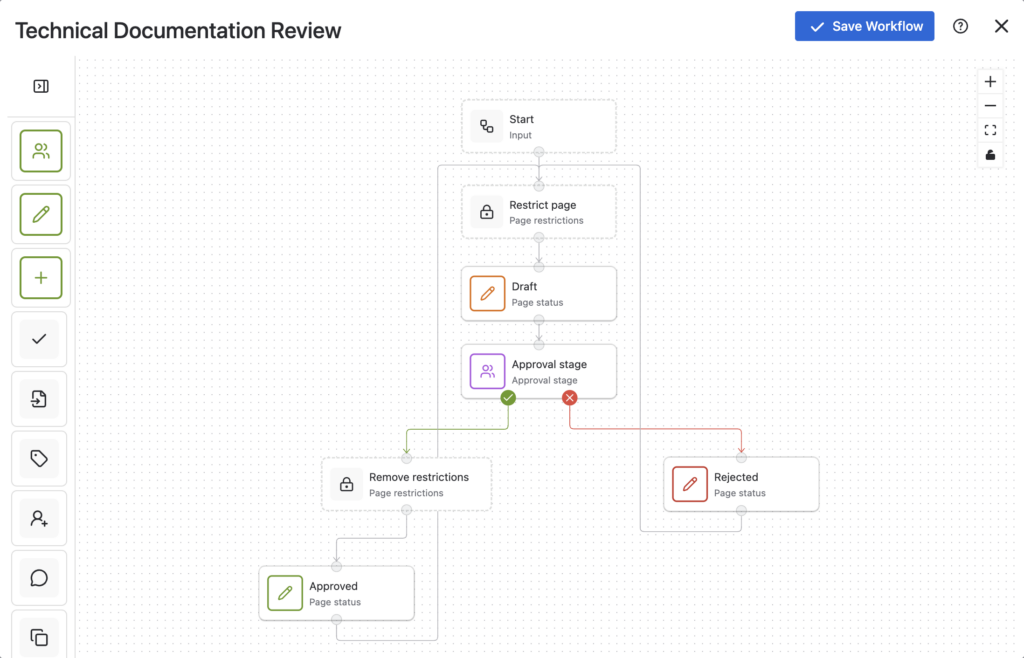
1. Approval workflows (review before publish)
Approval workflows are one of the most common requirements in Confluence, especially for teams managing shared or sensitive content.
This typically involves:
- creating content in a draft state
- assigning reviewers or approvers
- moving through one or more approval stages
- publishing once approved
You’ll see this pattern used across:
- technical documentation teams reviewing changes before publishing
- HR teams approving policies and internal communications
- cross-functional teams managing shared knowledge
If you’ve ever found yourself searching for “reviewing content before publishing in Confluence” or “how to manage approvals in Confluence”, this is where you need to start.
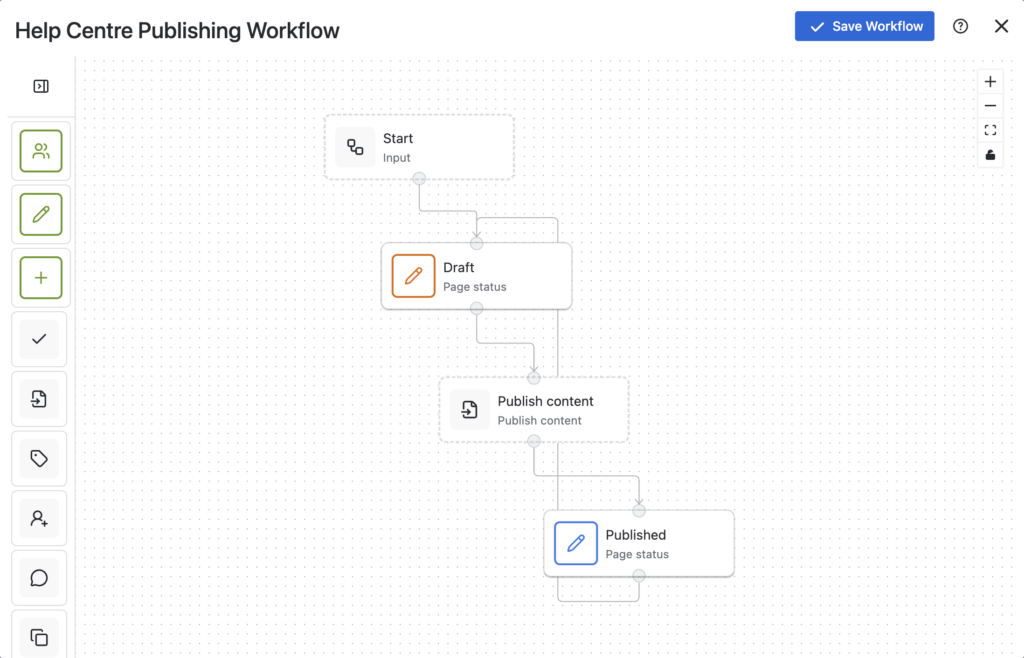
2. Publishing workflows (from draft to published)
Not every team needs formal approvals, but most still need control over when content goes live.
Publishing workflows focus on:
- separating draft and published content
- allowing teams to iterate before publishing
- keeping published content clean and reliable
This is particularly useful for:
- knowledge bases
- help centre content
- internal documentation
Maybe you’ve been looking to fund out how to publish something from a draft state in Confluence, how to publish changes made to one page into another or how to save the changes you’ve made in your draft, without publishing them in an official customer-facing way.
For many teams, this is the simplest way to introduce structure without adding unnecessary complexity.
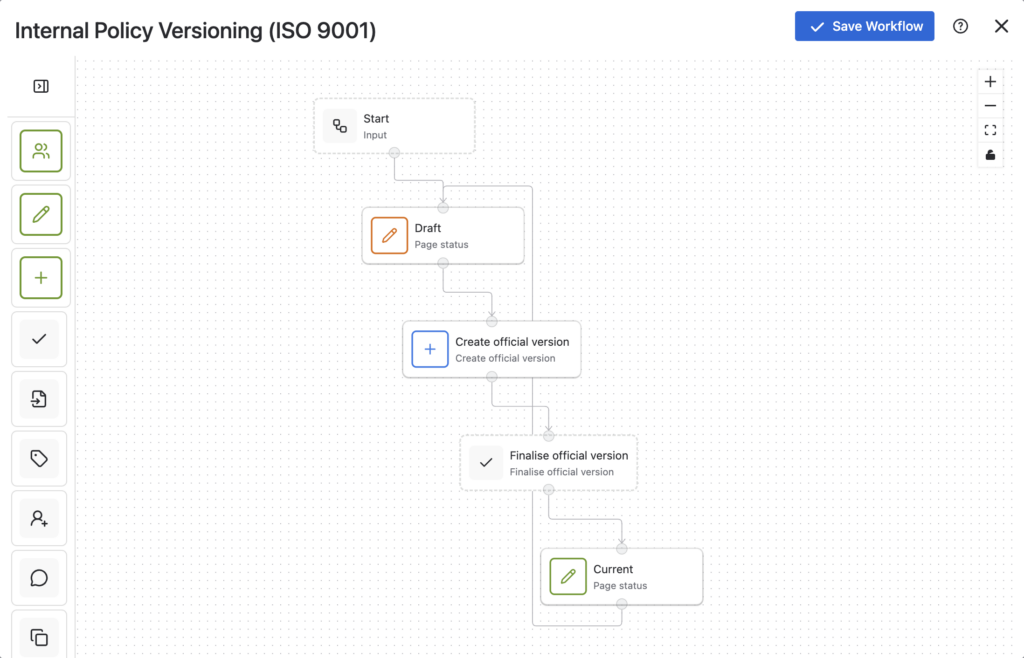
3. Version-controlled workflows (compliance and QMS)
For teams working in regulated environments, workflows need to go further.
It’s not just about approvals or publishing. It’s about control, traceability, and auditability.
Version-controlled workflows typically include:
- clearly defined version states
- controlled updates and approvals
- visibility into current vs previous versions
This is essential for:
- ISO-style processes (ISO 9001)
- quality management systems (QMS)
- compliance documentation
If you’re exploring Confluence version control or different types of official versioning for your documents in Confluence, you’re likely trying to implement this type of workflow.
Why starting from scratch slows teams down
With so much flexibility available, it’s tempting to build workflows from scratch.
But in practice, this often introduces friction.
Teams need to decide:
- which statuses to include
- how transitions should work
- who owns each stage
Without a clear starting point, this can lead to:
- slower rollout of workflows
- over-engineered processes
- inconsistencies between teams
This is especially common in larger organisations, where different teams end up solving the same problem in slightly different ways.
A faster approach: start with a template, then customise
A more practical approach is to start with a proven workflow pattern and adapt it as needed.
Instead of building everything from scratch, you begin with a structure that already reflects how most teams work.
Workflow templates make this possible by providing pre-built setups for:
- approval workflows
- publishing workflows
- version-controlled workflows
From there, you can:
- assign approvers
- rename statuses
- adjust transitions
- extend the workflow if needed
This reduces the upfront effort and helps teams move from setup to value much more quickly.
Importantly, this doesn’t limit flexibility. You can still customise workflows to match your exact requirements, it just removes the need to design everything from the ground up.
How this applies across teams
While the underlying patterns are similar, each team applies them slightly differently.
Technical documentation teams
Often combine approval and publishing workflows to manage review cycles and ensure content quality. This is a common approach for teams working on internal or external documentation in Confluence.
HR teams
Typically rely on approval workflows for policies and internal communications, with simple publishing flows to ensure content is reviewed before being shared.
If you’re exploring “Confluence for HR” or looking for “Confluence HR templates”, these workflows form the foundation.
Compliance and QMS teams
Use version-controlled workflows alongside approvals to ensure documents are auditable and meet regulatory requirements.
This is where structured workflows become essential for managing controlled documentation in Confluence.
Getting started with Confluence workflows
If you’re setting up workflows in Confluence for the first time, or looking to simplify existing ones, the best place to start is with the pattern that matches your use case.
From there:
- use a template as your starting point
- configure it to match your process
- expand only where necessary
This approach helps you move faster, maintain consistency, and avoid overcomplicating workflows early on.
For step-by-step guidance, including how to set up workflows for specific use cases, explore:
- technical documentation workflows in Confluence
- HR approval and publishing workflows
- compliance and version control workflows
Final thoughts
Confluence gives teams a huge amount of flexibility when it comes to workflows.
But flexibility doesn’t mean everything has to be built from scratch.
Most teams are solving similar problems – reviewing content, controlling publishing, and managing versions. Starting with these common patterns, and building from there, is often the fastest and most effective way to get value from workflows.